
Searching Cases by Name
The county website offers no name search form. You will not see Last Name, First Name, Case Number, and Search boxes. Instead, the District Court and County Court pages post dated PDFs. To hunt a name, open the sheet for the likely date. Use your browser's Find once it loads. Beware scanned sheets. Text search can fail there even though the name is plainly on the page.
- Identify the court from the notice, citation, pleading, or case type before searching.
- Open the correct Jeff Davis archive and select a likely year and docket date.
- Search the loaded PDF for the last name, then compare the full caption, cause number, and attorney or bondsman field.
- For a broader search, sign in to re:SearchTX and choose Cases, Filings, Text in Documents, or Hearings.
- Use filters shown in the current account view, then open the matching Case Details, Filing Details, or hearing dialog.
- Confirm the match with the clerk when the name is common, the PDF is scanned, or the statewide result lacks an image.
A name alone proves little. The court, Jeff Davis County, case type, date, and cause number all make a stronger match.
Jeff Davis Archive Date Search
Local search here starts with an event date. There is no query box. The District Court archive posts dated links for 394th criminal, civil, and pretrial sheets. A separate County Court archive lists constitutional County Court matters. Labels can read "ZOOM," "UPDATED," or "in-person docket." Read the PDF title before trusting it. One link may hold only a narrow setting list rather than a full register of actions.
Key distinction: A missing name on one Jeff Davis County setting sheet does not prove that no case exists.
Try the adjacent date too. Check for an updated version. If the file is broken or image-only, download it and open it in a capable PDF viewer, then call the clerk with the court, the date, the caption, and any cause number you have.
Searching by Case Number
An exact cause number beats a name search every time. On the County Court criminal docket, numbers run in a CR##-##### pattern: the letters mark the criminal series, then digits and a hyphenated sequence. Treat that as one sample. Not every Jeff Davis County case type follows it. Copy every letter, zero, and hyphen exactly as printed on the notice.
Give the clerk the whole number. Say “Jeff Davis County” too, and name the court. Why? The 394th District Court serves five counties, so a bare district number can send staff to the wrong file. For an older docket, ask whether the index sits on paper, microfilm, in an electronic system, or in a historic volume.
Jeff Davis Case Search Court Directory
The OCA Judicial Directory Search helps you pin down the right court or official. Run it before a Jeff Davis case search. It is not a party-name docket. Its controls are many. They include Search Type, Court Type, Court of Appeals District, County, Administrative Judicial Region, Court, District Primary Location Only, Address City, and Sort By. Choose Jeff Davis County and the right court level. The directory confirms which office should get your question. This helps most when a notice says "394th" and skips the five-county structure. The directory separates district court, constitutional County Court, and Justice Court contacts. It cannot return a case result or stand in for the clerk's record. The court is now clear. Go back to the county archive, re:SearchTX, or the clerk with the cause number.
Jeff Davis re:SearchTX Controls
re:SearchTX is the official registered statewide search layer. Its published quick reference documents the controls described here. Not every advanced-filter label appears outside the logged-in interface, so never assume a specific county, date, or case-type field will look the same after an update.
| Field label | Type | Required | Use |
|---|---|---|---|
| Search | Text | Unspecified | Enter a keyword and press Enter or Search |
| Cases | Tab or card | Select mode | Search case index and details |
| Filings | Tab or card | Select mode | Find filing records |
| Text in Documents | Tab or card | Select mode | Search accessible document text |
| Hearings | Tab or card | Select mode | Find hearing records and details |
| Left-side filters | Filter controls | Optional | Narrow the selected result set |
| Export / Save Search | Buttons | Optional | Export or retain a query when enabled |
The official re:SearchTX landing screen is where this Jeff Davis County case search channel begins.
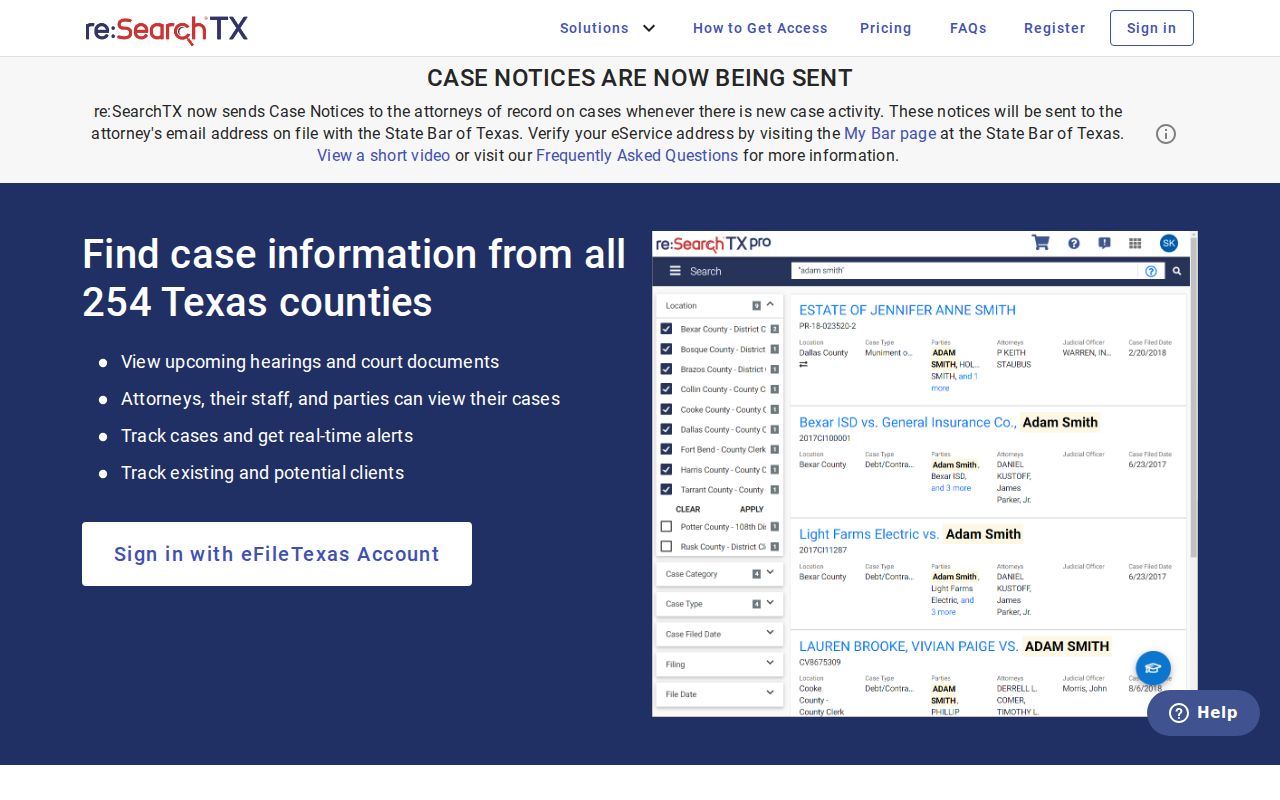
Registration unlocks the search workflow. It does not promise that every Jeff Davis file or document image is there.
What a Case Search Returns
The two systems answer different questions. A Jeff Davis County PDF may show one scheduled row. re:SearchTX may open Case Details, Filing Details, a hearing dialog, or readable document text. Judge each field by what it actually proves.
| Case number | Identifies the file when paired with the correct court and county. |
|---|---|
| Party or caption | Names the matter; compare the full caption when names are common. |
| Court and judge | Shows the tribunal and listed assignment for that dated record. |
| Filed or setting date | Distinguish the filing date from a hearing or docket-call date. |
| Action or type | May say HEARING, STATUS HEARING, pretrial, or a case category. |
| Filing detail | Identifies a filing, but an index entry does not equal a certified copy. |
A case number is not a disposition. A listed time does not mean the hearing happened, and a listed action does not reveal the ruling, payment balance, warrant status, or compliance.
Jeff Davis Case Search Tabs
Each statewide tab asks a different question. "Cases" is the broad index route. "Filings" targets filed-item metadata, while "Text in Documents" searches content your role can access. "Hearings" targets scheduled events. Click a case description, filing description, or hearing type to open its detail view.
- Case Details
- Index and case-level data linked from a case description.
- Filing Details
- Information about a submitted filing, which may not include an open image.
- Hearing detail
- Setting information reached by selecting the hearing type.
- Register
- The chronological court record of filed actions and events, broader than one calendar sheet.
OCA materials separate free index access from document access. The public document charge is $0.10 per page, capped at $6 per document. Confirm the checkout process and your access role before ordering.
Statewide vs County Case Search
County PDFs and re:SearchTX overlap without replacing each other. For a dated Jeff Davis docket snapshot, the local archive is clearer. The statewide tool fits participating electronic records and searches that cross county lines.
| Point | re:SearchTX | Jeff Davis archive |
|---|---|---|
| Access | Registered account | Public dated PDF links |
| Search model | Cases, filings, text, hearings, filters | Choose year and docket date |
| Coverage | Participating electronic records; limitations apply | Selected local setting sheets |
| Best use | Broader electronic case search | Known Jeff Davis court date |
| Documents | Role and fees may limit images | Posted sheet, not the full case file |
The clerk still holds the underlying local file and certified copies. Statewide reporting has flagged criminal coverage limits. Check Jeff Davis integration directly rather than assuming it.
Older Jeff Davis Case Search Records
Hunting an older Jeff Davis County case search record can push you past the current online tools. The county pages post some historic activity reports and old docket PDFs. They do not promise a full digital date range, though. One case may sit in a paper volume. Another sits on microfilm, in an older electronic archive, or in the current case-management system. A missing dated PDF is a search limit. It is never a finding about the case itself.
Call Jennifer Wright’s clerk office with details ready. Bring the court, the approximate filing date, the caption, and the cause number if you have it. Ask which index covers that period. Ask whether staff can hand you a plain or certified copy. The county publishes no local historic-search fee, turnaround time, or request form. Confirm the current method and charge before you mail a request or drive to the office.
Jeff Davis Filing Is Not Search
eFileTexas handles electronic submissions and lets you pick a service provider. It is not the Jeff Davis County public docket. A filing receipt only proves the document moved through the filing channel. It does not make every register entry or document image public, and it is no substitute for a certified court copy.
The line blurs because re:SearchTX uses eFileTexas credentials for sign-in or registration. Keep the tasks apart. File through eFileTexas. Search participating case records through re:SearchTX. Check dated local calendars on the county pages, and get an official copy from Jennifer Wright’s clerk office. One wrinkle: the countywide Justice Court page says it accepts nothing electronically. Its local process differs from District Court e-filing.
No Jeff Davis Search Result
A “not found” result has many causes. It could be the wrong court, an unposted docket date, a scanned PDF, an older paper record, limited statewide integration, or restricted content. None of that means the case is sealed. Use the fallback that matches the court.
- Call the District and County Clerk at 432-426-3251 for District or constitutional County Court files.
- Call the 394th coordinator at 432-837-5831 for a live district setting.
- Call the countywide JP at 432-426-3045 for traffic, Class C, small-claims, or minor civil matters.
- Ask whether an older index is in paper, microfilm, an electronic archive, or a historic volume.
- Send a written clerk request for a full document or certified copy and ask the current fee first.
Federal matters run through PACER for the Western District of Texas, not re:SearchTX. For a city citation, the county offers no official local municipal docket portal. Confirm the route with the issuing city or the JP.
Access and Restricted Cases
Public access to court records has legal limits. Texas Rule of Civil Procedure 76a presumes civil court records are open. Sealing requires its own notice, hearing, and findings. Jeff Davis County adds a 394th standing order. It restricts pleadings, reports, orders, and other records in qualifying DFPS matters under Family Code section 261.201.
A public case number or calendar line does not unlock every child-protection, juvenile, or confidential document behind it. The index may list an event while holding back a protected image. The setting sheet may omit the matter entirely. Ask the clerk what part is releasable. Ask whether a redacted copy exists, and whether you need a court order.
Texas Public Information Act requests are not a universal lane for court case records. OCA’s open-records policy explains that judicial case records generally stay with the clerk. Ordinary case-record denials do not use the Rule 12 special-committee appeal route.